Showing posts with label Octave. Show all posts

Thursday, December 21, 2023

Judging the Quality of Indicators.

Judging the Quality of Indicators.

In my previous post I said I was trying to develop new indicators from the results of my new PositionBook optimisation routine. In doing so, I need to have a methodology for judging the quality of the indicator(s). In the past I created a Data-Snooping-Tests-GitHub which contains some tests for statistical significance testing and which, of course, can be used on these new indicators. Additionally, for many years I have had a link to tssb on this blog from where a free testing program, VarScreen, and its associated manual are available. Timothy Masters also has a book, Testing and Tuning Market Trading Systems, wherein there is C++ code for an Entropy test, an Octave compiled .oct version of which is shown in the following code box.

#include "octave oct.h"
#include "octave dcolvector.h"
#include "cmath"
#include "algorithm"

DEFUN_DLD ( entropy, args, nargout,
"-*- texinfo -*-\n\
@deftypefn {Function File} {entropy_value =} entropy (@var{input_vector,nbins})\n\
This function takes an input vector and nbins and calculates\n\
the entropy of the input_vector. This input_vector will usually\n\
be an indicator for which we want the entropy value. This value ranges\n\
from 0 to 1 and a minimum value of 0.5 is recommended. Less than 0.1 is\n\
serious and should be addressed. If nbins is not supplied, a default value\n\
of 20 is used. If the input_vector length is < 50, an error will be thrown.\n\
@end deftypefn" )

{
octave_value_list retval_list ;
int nargin = args.length () ;
int nbins , k ;
double entropy , factor , p , sum ;

// check the input arguments
if ( args(0).length () < 50 )
{
error ("Invalid 1st argument length. Input is a vector of length >= 50.") ;
return retval_list ;
}

if ( nargin == 1 )
{
nbins = 20 ;
}

if ( nargin == 2 )
{
nbins = args(1).int_value() ;
}
// end of input checking

ColumnVector input = args(0).column_vector_value () ;
ColumnVector count( nbins ) ;
double max_val = *std::max_element( &input(0), &input( args(0).length () - 1 ) ) ;
double min_val = *std::min_element( &input(0), &input( args(0).length () - 1 ) ) ;
factor = ( nbins - 1.e-10 ) / ( max_val - min_val + 1.e-60 ) ;

for ( octave_idx_type ii ( 0 ) ; ii < args(0).length () ; ii++ ) {
k = ( int ) ( factor * ( input( ii ) - min_val ) ) ;
++count( k ) ; }

sum = 0.0 ;
for ( octave_idx_type ii ( 0 ) ; ii < nbins ; ii++ ) {
if ( count( ii ) ) {
p = ( double ) count( ii ) / args(0).length () ;
sum += p * log ( p ) ; }
}

entropy = -sum / log ( (double) nbins ) ;

retval_list( 0 ) = entropy ;

return retval_list ;

} // end of function

This calculates the information content, Entropy_(information_theory), of any indicator, the value for which ranges from 0 to 1, with a value of 1 being ideal. Masters suggests that a minimum value of 0.5 is acceptable for indicators and also suggests ways in which the calculation of any indicator can be adjusted to improve its entropy value. By way of example, below is a plot of an "ideal" (blue) indicator, which has values uniformly spread across its range
with an entropy value of 0.9998. This second plot shows a "good" indicator, which has an

entropy value of 0.7781 and is in fact just random, normally distributed values with a mean of 0 and variance 1. In both plots, the red indicators fail to meet the recommended minimum value, both having entropy values of 0.2314.

It is visually intuitive that in both plots the blue indicators convey more information than the red ones. In creating my new PositionBook indicators I intend to construct them in such a way as to maximise their entropy before I progress to some of the above mentioned tests.

Wednesday, November 22, 2023

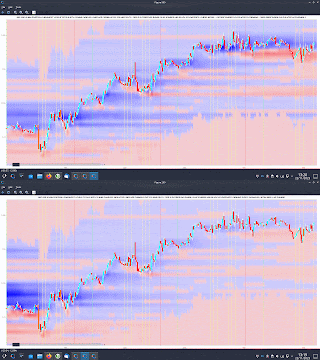
Update to PositionBook Chart - Revised Optimisation Method

Update to PositionBook Chart - Revised Optimisation Method

Just over a year ago I previewed a new chart type which I called a "PositionBook Chart" and gave examples in this post and this one. These first examples were based on an optimisation routine over 6 variables using Octave's fminunc function, an unconstrained minimisation routine. However, I was not 100% convinced that the model I was using for the loss/cost function was realistic, and so since the above posts I have been further testing different models to see if I could come up with a more satisfactory model and optimisation routine. The comparison between the original model and the better, newer model I have selected is indicated in the following animated GIF, which shows the last few day's action in the GBPUSD forex pair. 

The old model is figure(200), with the darker blue "blob" of positions accumulated at the lower, beginning of the chart, and the newer model, figure(900), shows accumulation throughout the uptrend. The reasons I prefer this newer model are:

  • 4 of the 6 variables mentioned above (longs above and below price bar range, and shorts above and below price bar range) are theoretically linked to each other to preserve their mutual relationships and jointly minimised over a single input to the loss/cost function, which has a bounded upper and lower limit. This means I can use Octave's fminbnd function instead of fminunc. The minimisation objective is the minimum absolute change in positions outside the price bar range, which has a real world relevance as compared to the mean squared error of the fminunc cost function.
  • because fminunc is "unconstrained" occasionally it would converge to unrealistic solutions with respect to position changes outside the price bar range. This does not happen with the new routine.
  • once the results of fminbnd are obtained, it is possible to mathematically calculate the position changes within the price bar range exactly, without needing to resort to any optimisation routine. This gives a zero error for the change which is arguably the most important.
  • the results from the new routine seem to be more stable in that indicators I am trying to create from them are noticeably less erratic and confusing than those created from fminunc results.
  • finally, fminbnd over 1 variable is much quicker to converge than fminunc over 6 variables.
The second last mentioned point, derived indicators, will be the subject of my next post.

Sunday, August 20, 2023

Currency Strength Revisited

Currency Strength Revisited

Recently I responded to a Quantitative Finance forum question here, where I invited the questioner to peruse certain posts on this blog. Apparently the posts do not provide enough information to fully answer the question (my bad) and therefore this post provides what I think will suffice as a full and complete reply, although perhaps not scientifically rigorous.

The original question asked was "Is it possible to separate or decouple the two currencies in a trading pair?" and I believe what I have previously described as a "currency strength indicator" does precisely this (blog search term ---> https://dekalogblog.blogspot.com/search?q=currency+strength+indicator). This post outlines the rationale behind my approach.

Take, for example, the GBPUSD forex pair, and further give it a current (imaginary) value of 1.2500. What does this mean? Of course it means 1 GBP will currently buy you 1.25 USD, or alternatively 1 USD will buy you 1/1.25 = 0.8 GBP. Now rather than write GBPUSD let's express GBPUSD as a ratio thus:- GBP/USD, which expresses the idea of "how many USD are there in a GBP?" in the same way that 9/3 shows how many 3s there are in 9. Now let's imagine at some time period later there is a new pair value, a lower case "gbp/usd" where we can write the relationship

                    (1)     ( GBP / USD ) * ( G / U ) = gbp / usd

to show the change over the time period in question. The ( G / U ) term is a multiplicative term to show the change in value from old GBP/USD 1.2500 to say new value gbp/usd of 1.2600, 

e.g.                ( G / U ) == ( gbp / usd ) / ( GBP / USD ) == 1.26 / 1.25 == 1.008

from which it is clear that the forex pair has increased by 0.8% in value over this time period. Now, if we imagine that over this time period the underlying, real value of USD has remained unchanged this is equivalent to setting the value U in ( G / U ) to exactly 1, thereby implying that the 0.8% increase in the forex pair value is entirely attributable to a 0.8% increase in the underlying, real value of GBP, i.e. G == 1.008. Alternatively, we can assume that the value of GBP remains unchanged,

 e.g.                G == 1, which means that U == 1 / 1.008 == 0.9921

which implies that a ( 1 - 0.9921 ) == 0.79% decrease in USD value is responsible for the 0.8% increase in the pair quote.

Of course, given only equation (1) it is impossible to solve for G and U as either can be arbitrarily set to any number greater than zero and then be compensated for by setting the other number such that the constant ( G / U ) will match the required constant to account for the change in the pair value.

However, now let's introduce two other forex pairs (2) and (3) and thus we have:-

                    (1)     ( GBP / USD ) * ( G / U ) = gbp / usd

                    (2)     ( EUR / USD ) * ( E / U ) = eur / usd

                    (3)     ( EUR / GBP ) * ( E / G ) = eur / gbp

We now have three equations and three unknowns, namely G, E and U, and so this system of equations could be laboriously, mathematically solved by substitution. 

However, in my currency strength indicator I have taken a different approach. Instead of solving mathematically I have written an error function which takes as arguments a list of G, E, U, ... etc. for all currency multipliers relevant to all the forex quotes I have access to, approximately 47 various crosses which themselves are inputs to the error function, and this function is supplied to Octave's fminunc function to simultaneously solve for all G, E, U, ... etc. given all forex market quotes. The initial starting values for all G, E, U, ... etc. are 1, implying no change in values across the market. These starting values consistently converge to the same final values for G, E, U, ... etc for each separate period's optimisation iterations.

Having got all G, E, U, ... etc. what can be done? Well, taking G for example, we can write

                    (4)     GBP * G = gbp

for the underlying, real change in the value of GBP. Dividing each side of (4) by GBP and taking logs we get

                    (5)     log( G ) = log( gbp / GBP )

i.e. the log of the fminunc returned value for the multiplicative constant G is the equivalent of the log return of GBP independent of all other currencies, or as the original forum question asked, the (change in) value of GBP separated or decoupled the from the pair in which it is quoted.

Of course, having the individual log returns of separated or decoupled currencies, there are many things that can be done with them, such as:-

  • create indices for each currency
  • apply technical analysis to these separate indices
  • intermarket currency analysis
  • input to machine learning (ML) models
  • possibly create new and unique currency indicators

Examples of the creation of "alternative price charts" and indices are shown below

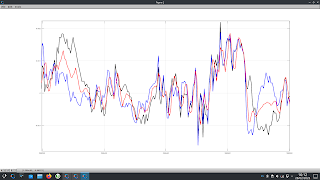
where the black line is the actual 10 minute closing prices of GBPUSD over the
last week (13th to 18th August) with the corresponding GBP price (blue line) being the "alternative" GBPUSD chart if U is held at 1 in the ( G / U ) term and G allowed to be its derived, optimised value, and the USD price (red line) being the alternative chart if G is held at 1 and U allowed to be its derived, optimised value.

This second chart shows a more "traditional" index like chart

where the starting values are 1 and both the G and U values take their derived values. As can be seen, over the week there was upwards momentum in both the GBP and USD, with the greater momentum being in the GBP resulting in a higher GBPUSD quote at the end of the week. If, in the second chart the blue GBP line had been flat at a value of 1 all week, the upwards momentum in USD would have resulted in a lower week ending quoted value of GBPUSD, as seen in the red USD line in the first chart. Having access to these real, decoupled returns allows one to see through the given, quoted forex prices in the manner of viewing the market as though through X-ray vision. 

I hope readers find this post enlightening, and if you find some other uses for this idea, I would be interested in hearing how you use it.
 

Tuesday, May 30, 2023

Tuesday, February 28, 2023

Kalman Filter and Sensor Fusion.

Kalman Filter and Sensor Fusion.

In the Spring of 2012 and again in the Spring of 2019 I posted a series of posts about the Kalman Filter, which readers can access via the blog archive on the right. In both cases I eventually gave up those particular lines of investigation because of disappointing results. This post is the first in a new series about using the Kalman Filter for sensor fusion, which I had known of before, but due to the paucity of clear information about this online I had never really investigated. However, my recent discovery of this Github and its associated online tutorial has inspired me to a third attempt at using Kalman Filters. What I am going to attempt to do is use the idea of sensor fusion to fuse the output of several functions I have coded in the past, which each extract the dominant cycle from a time series, to hopefully obtain a better representation of the "true underlying cycle."

The first step in this process is to determine the measurement noise covariance or, in Kalman Filter terms, the "R" covariance matrix. To do this, I have used the average of two of the outputs from the above mentioned functions to create a new cycle and similarly used two extracted trends (price minus these cycles) averaged to get a new trend. The new cycle and new trend are simply added to each other to create a new price series which is almost identical to the original price series. The screenshot below shows a typical cycle extract,

where the red cycle is the average of the other two extracted cycles, and this following screenshot shows the new trend in red plus the new price alongside the old price (blue and black respectively).
Having created a time series thus with known trend and cycle, it is a simple matter to run my cycle extractor functions on this new price, compare the outputs with the known cyclic component of price and calculate the variance of the errors to get the R covariance matrices for 14 different currency crosses.

More in due course.


Friday, November 18, 2022

PositionBook Chart Example Trade

PositionBook Chart Example Trade

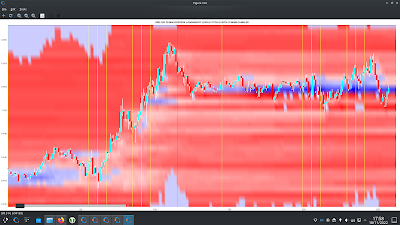
As a quick follow up to my previous post I thought I'd show an example of how one could possibly use my new PositionBook chart as a trade set-up. Below is the USD_CHF forex pair for the last two days

showing the nice run-up yesterday and then the narrow range of Friday's Asian session.

The tentative set-up idea is to look for such a narrow range and use the colour of the PositionBook chart in this range (blue for a long) to catch or anticipate a breakout. The take profit target would be the resistance suggested by the horizontal yellow bar in the open orders chart (overhead sell orders) more or less at Thursday's high.

I decided to take a really small punt on this idea but took a small loss of 0.0046 GBP
as indicated in the above Oanda trade app. I entered too soon and perhaps should have waited for confirmation (I can see a doji bar on the 5 minute chart just after my stop out) or had the conviction to re-enter the trade after this doji bar. The initial trade idea seems to have been sound as the profit target was eventually hit. This could have been a nice 4/5/6 R-multiple profitable trade.😞

Friday, April 8, 2022

Simple Machine Learning Models on OrderBook/PositionBook Features

Simple Machine Learning Models on OrderBook/PositionBook Features

This post is about using OrderBook/PositionBook features as input to simple machine learning models after previous investigation into the relevance of such features. 

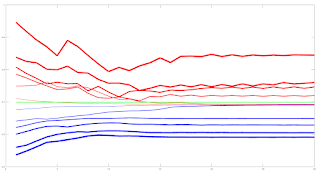
Due to the amount of training data available I decided to look only at a linear model and small neural networks (NN) with a single hidden layer with up to 6 hidden neurons. This choice was motivated by an academic paper I read online about linear models which stated that, as a lower bound, one should have at least 10 training examples for each parameter to be estimated. Other online reading about order flow imbalance (OFI) suggested there is a linear relationship between OFI and price movement. Use of limited size NNs would allow a small amount of non linearity in the relationship. For this investigation I used the Netlab toolbox and Octave. A plot of the learning curves of the classification models tested is shown below. The targets were binary 1/0 for price increases/decreases.

The blue lines show the average training error (y axis) and the red lines show the same average error metric on the held out cross validation data set for each tested model. The thickness of the lines represents the number of neurons in the single hidden layer of the NNs (the thicker the lines, the higher the number of hidden neurons). The horizontal green line shows the error of a generalized linear model (GLM) trained using iteratively reweighted least squares. It can be seen that NN models with 1 and 2 hidden neurons slightly outperform the GLM, with the 2 neuron model having the edge over the 1 neuron model. NN models with 3 or more hidden neurons over fit and underperform the GLM. The NN models were trained using Netlab's functions for Bayesian regularization over the parameters.

Looking at these results it would seem that a 2 neuron NN would be the best choice; however the error differences between the 1 and 2 neuron NNs and GLM are small enough to anticipate that the final classifications (with a basic greater/less than a 0.5 logistic threshold value for long/short) would perhaps be almost identical. 

Investigations into this will be the subject of my next post. 

The code box below gives the working Octave code for the above.

## load data
##training_data = dlmread( 'raw_netlab_training_features' ) ;
##cv_data = dlmread( 'raw_netlab_cv_features' ) ;
training_data = dlmread( 'netlab_training_features_svd' ) ;
cv_data = dlmread( 'netlab_cv_features_svd' ) ;
training_targets = dlmread( 'netlab_training_targets' ) ;
cv_targets = dlmread( 'netlab_cv_targets' ) ;

kk_loop_record = zeros( 30 , 7 ) ;

for kk = 1 : 30

## first train a glm model as a base comparison
input_dim = size( training_data , 2 ) ; ## Number of inputs.

net_lin = glm( input_dim , 1 , 'logistic' ) ; ## Create a generalized linear model structure.
options = foptions ; ## Sets default parameters for optimisation routines, for compatibility with MATLAB's foptions()
options(1) = 1 ; ## change default value
## OPTIONS(1) is set to 1 to display error values during training. If
## OPTIONS(1) is set to 0, then only warning messages are displayed. If
## OPTIONS(1) is -1, then nothing is displayed.
options(14) = 5 ; ## change default value
## OPTIONS(14) is the maximum number of iterations for the IRLS
## algorithm; default 100.
net_lin = glmtrain( net_lin , options , training_data , training_targets ) ;

## test on cv_data
glm_out = glmfwd( net_lin , cv_data ) ;
## cross-entrophy loss
glm_out_loss = -mean( cv_targets .* log( glm_out ) .+ ( 1 .- cv_targets ) .* log( 1 .- glm_out ) ) ;

kk_loop_record( kk , 7 ) = glm_out_loss ;

## now train an mlp
## Set up vector of options for the optimiser.
nouter = 30 ; ## Number of outer loops.
ninner = 2 ; ## Number of innter loops.
options = foptions ; ## Default options vector.
options( 1 ) = 1 ; ## This provides display of error values.
options( 2 ) = 1.0e-5 ; ## Absolute precision for weights.
options( 3 ) = 1.0e-5 ; ## Precision for objective function.
options( 14 ) = 100 ; ## Number of training cycles in inner loop.

training_learning_curve = zeros( nouter , 6 ) ;
cv_learning_curve = zeros( nouter , 6 ) ;

for jj = 1 : 6

## Set up network parameters.
nin = size( training_data , 2 ) ; ## Number of inputs.
nhidden = jj ; ## Number of hidden units.
nout = 1 ; ## Number of outputs.
alpha = 0.01 ; ## Initial prior hyperparameter.
aw1 = 0.01 ;
ab1 = 0.01 ;
aw2 = 0.01 ;
ab2 = 0.01 ;

## Create and initialize network weight vector.
prior = mlpprior(nin , nhidden , nout , aw1 , ab1 , aw2 , ab2 ) ;
net = mlp( nin , nhidden , nout , 'logistic' , prior ) ;

## Train using scaled conjugate gradients, re-estimating alpha and beta.
for ii = 1 : nouter
## train net
net = netopt( net , options , training_data , training_targets , 'scg' ) ;

train_out = mlpfwd( net , training_data ) ;
## get train error
## mse
##training_learning_curve( ii ) = mean( ( training_targets .- train_out ).^2 ) ;

## cross entropy loss
training_learning_curve( ii , jj ) = -mean( training_targets .* log( train_out ) .+ ( 1 .- training_targets ) .* log( 1 .- train_out ) ) ;

cv_out = mlpfwd( net , cv_data ) ;
## get cv error
## mse
##cv_learning_curve( ii ) = mean( ( cv_targets .- cv_out ).^2 ) ;

## cross entropy loss
cv_learning_curve( ii , jj ) = -mean( cv_targets .* log( cv_out ) .+ ( 1 .- cv_targets ) .* log( 1 .- cv_out ) ) ;

## now update hyperparameters based on evidence
[ net , gamma ] = evidence( net , training_data , training_targets , ninner ) ;

## fprintf( 1 , '\nRe-estimation cycle ##d:\n' , ii ) ;
## disp( [ ' alpha = ' , num2str( net.alpha' ) ] ) ;
## fprintf( 1 , ' gamma = %8.5f\n\n' , gamma ) ;
## disp(' ')
## disp('Press any key to continue.')
##pause;
endfor ## ii loop

endfor ## jj loop

kk_loop_record( kk , 1 : 6 ) = cv_learning_curve( end , : ) ;

endfor ## kk loop

plot( training_learning_curve(:,1) , 'b' , 'linewidth' , 1 , cv_learning_curve(:,1) , 'r' , 'linewidth' , 1 , ...
training_learning_curve(:,2) , 'b' , 'linewidth' , 2 , cv_learning_curve(:,2) , 'r' , 'linewidth' , 2 , ...
training_learning_curve(:,3) , 'b' , 'linewidth' , 3 , cv_learning_curve(:,3) , 'r' , 'linewidth' , 3 , ...
training_learning_curve(:,4) , 'b' , 'linewidth' , 4 , cv_learning_curve(:,4) , 'r' , 'linewidth' , 4 , ...
training_learning_curve(:,5) , 'b' , 'linewidth' , 5 , cv_learning_curve(:,5) , 'r' , 'linewidth' , 5 , ...
training_learning_curve(:,6) , 'b' , 'linewidth' , 6 , cv_learning_curve(:,6) , 'r' , 'linewidth' , 6 , ...
ones( size( training_learning_curve , 1 ) , 1 ).*glm_out_loss , 'g' , 'linewidth', 2 ) ;

## >> mean(kk_loop_record)
## ans =
##
## 0.6928 0.6927 0.7261 0.7509 0.7821 0.8112 0.6990

## >> std(kk_loop_record)
## ans =
##
## 8.5241e-06 7.2869e-06 1.2999e-02 1.5285e-02 2.5769e-02 2.6844e-02 2.2584e-16

Tuesday, February 15, 2022

A Possible, New Positionbook Indicator?

A Possible, New Positionbook Indicator?

In my previous post I ended with saying that I would post about some sort of "sentiment indicator" if, and only if, I had something positive to say about my progress on this work. This post is the first on this subject.

The indicator I'm working on is based on the open position ratios data that is available via the Oanda api. For the uninitiated, this data gives the percentage of traders holding long and short positions, and at what price levels, in 14 selected forex pairs and also gold and silver. The data is updated every 20 minutes. I have long felt that there must be some value hidden in this data but the problem is how to extract it.

What I've done is take the percentage values from the (usually) hundreds of separate price levels and sum and normalise them over three defined ranges - levels above/below the high/low of each 20 minute period and the level(s) that span the price range of this period. This is done separately for long and short positions to give a total of 6 percentage figures that sum to 100%. Conceptually, this can be thought of as attaching to the open and close of a 20 minute OHLC bar the 6 percentage position values that were in force at the open and close respectively. The problem is to try and infer the actual, net changes in positions that have taken place over the time period this 20 minute bar was forming. In this way I am trying, if you like, to create a sort of  "skin in the game" indicator as opposed to an indicator derived from order book data, which could be said to be based on traders' current (changeable) intentions as expressed by their open orders and which are subject to shenanigans such as spoofing.

The methodology I've decided on to realise the above is constrained optimization using Octave's fmincon function. The objective function is simply:

    denom = X' * old_pb_net_pos ;

    J = mean( ( new_pb_net_pos .- ( ( X .* old_pb_net_pos ) ./ denom ) ).^2 ) ;

for a multiplicative position value change model where:

  • X is a vector of constants that are to be optimised
  • old_pb_net_pos is a vector of the 6 percentage values at the open
  • new_pb_net_pos is a vector of the 6 percentage values at the close

This is a constrained model because percentage position values at price levels outside the bar range cannot actually increase as a result of trades that take place within the bar range, so the X values for these levels are necessarily constrained to a maximum value of 1 (implying no real, absolute change at these levels). Similarly, all X values must be greater than zero (a zero value would imply a mass exit of all positions at this level, which never actually happens).

The net result of the above is an optimised X vector consisting of multiplicative constants that are multiplied with old_pb_net_pos to achieve new_pb_net_pos according to the logic exemplified in the above objective function. It is these optimised X values from which the underlying, real changes in positions will be inferred and features created. More on this in my next post.


Tuesday, January 4, 2022

Matrix Profile and Weakly Labelled Data - 2nd and Final Update

Matrix Profile and Weakly Labelled Data - 2nd and Final Update

It has been over three months since my last post, which was intended to be the first in a series of posts on the subject of the title of this post. However, it turned out that the results of my work were underwhelming and so I decided to stop flogging a dead horse and move onto other things. I still have some ideas for using Matrix Profile, but not for the above. These ideas may be the subject of a future blog post.

I subsequently looked at plotting order levels using the data that is available via the Oanda API and I have come up with Octave code to render plots such as this:

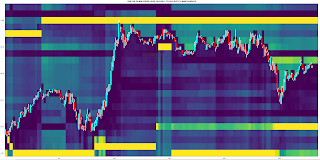
where the brighter yellow stripes show ranges where there is an accumulation of sell/buy orders above/below price. These can be interpreted as support/resistance areas. It is normally my practice to post my Octave code, but the code for this plot is quite idiosyncratic and depends very much on the way I have chosen to store the underlying data downloaded from Oanda. As such, I don't think it would be helpful to readers and so I am not posting the code. That said, if there is actually a demand I am more than happy to make it available in a future blog post.

Having done this, it seemed natural to extend it to Open Position Ratios which are also available via the Oanda API. Plotting these levels renders plots that are similar to the plot shown above, but show levels where open long/short positions instead of open orders are accumulated. Although such plots are visually informative, I prefer something more objective, and so for the last few weeks I have been working on using the open position ratios data to construct some sort of sentiment indicator that hopefully could give a heads up to future price movement direction. This is still very much a work in progress which I shall post about if there are noteworthy results.

More in due course.

Friday, September 17, 2021

Matrix Profile and Weakly Labelled Data - Update 1

Matrix Profile and Weakly Labelled Data - Update 1

This is the first post in a short series detailing my recent work following on from my previous post. This post will be about some problems I have had and how I partially solved them.

The main problem was simply the speed at which the code (available from the companion website) seems to run. The first stage Matrix Profile code runs in a few seconds, the second, individual evaluation stage in no more than a few minutes, but the third stage, greedy search, which uses Golden Section Search over the pattern candidates, can take many, many hours. My approach to this was simply to optimise the code to the best of my ability. My optimisations, all in the compute_f_meas.m function, are shown in the following code boxes. This while loop

i = 1;
while true

if i >= length(anno_st)
break;
endif

first_part = anno_st(1:i);
second_part = anno_st(i+1:end);
bad_st = abs(second_part - anno_st(i)) < sub_len;
second_part = second_part(~bad_st);
anno_st = [first_part; second_part;];
i = i + 1;

endwhile
is replaced by this .oct compiled version of the same while loop
#include 
#include

DEFUN_DLD ( stds_f_meas_while_loop_replace, args, nargout,
"-*- texinfo -*-\n\
@deftypefn {Function File} {} stds_f_meas_while_loop_replace (@var{input_vector,sublen})\n\
This function takes an input vector and a scalar sublen\n\
length. The function sets to zero those elements in the\n\
input vector that are closer to the preceeding value than\n\
sublen. This function replaces a time consuming .m while loop\n\
in the stds compute_f_meas.m function.\n\
@end deftypefn" )

{
octave_value_list retval_list ;
int nargin = args.length () ;

// check the input arguments
if ( nargin != 2 ) // there must be a vector and a scalar sublen
{
error ("Invalid arguments. Inputs are a column vector and a scalar value sublen.") ;
return retval_list ;
}

if ( args(0).length () < 2 )
{
error ("Invalid 1st argument length. Input is a column vector of length > 1.") ;
return retval_list ;
}

if ( args(1).length () > 1 )
{
error ("Invalid 2nd argument length. Input is a scalar value for sublen.") ;
return retval_list ;
}
// end of input checking

ColumnVector input = args(0).column_vector_value () ;
double sublen = args(1).double_value () ;
double last_iter ;

// initialise last_iter value
last_iter = input( 0 ) ;

for ( octave_idx_type ii ( 1 ) ; ii < args(0).length () ; ii++ )
{

if ( input( ii ) - last_iter >= sublen )
{
last_iter = input( ii ) ;
}
else
{
input( ii ) = 0.0 ;
}

} // end for loop

retval_list( 0 ) = input ;

return retval_list ;

} // end of function
and called thus
anno_st = stds_f_meas_while_loop_replace( anno_st , sub_len ) ;
anno_st( anno_st == 0 ) = [] ;
This for loop
is_tp = false(length(anno_st), 1);
for i = 1:length(anno_st)
if anno_ed(i) > length(label)
anno_ed(i) = length(label);
end
if sum(label(anno_st(i):anno_ed(i))) > 0.8*sub_len
is_tp(i) = true;
end
end
tp_pre = sum(is_tp);
is replaced by use of cellslices.m and cellfun.m thus
label_length = length( label ) ;
anno_ed( anno_ed > label_length ) = label_length ;
cell_slices = cellslices( label , anno_st , anno_ed ) ;
cell_sums = cellfun( @sum , cell_slices ) ;
tp_pre = sum( cell_sums > 0.8 * sub_len ) ;
and a further for loop
is_tp = false(length(pos_st), 1);
for i = 1:length(pos_st)
if sum(anno(pos_st(i):pos_ed(i))) > 0.8*sub_len
is_tp(i) = true;
end
end
tp_rec = sum(is_tp);
is replaced by
cell_slices = cellslices( anno , pos_st , pos_ed ) ;
cell_sums = cellfun( @sum , cell_slices ) ;
tp_rec = sum( cell_sums > 0.8 * sub_len ) ;

Although the above measurably improves running times, overall the code of the third stage is still sluggish. I have found that the best way to deal with this, on the advice of the original paper's author, is to limit the number of patterns to search for, the "pat_max" variable, to the minimum possible to achieve a satisfactory result. What I mean by this is that if  pat_max = 5 and the result returned also has 5 identified patterns, incrementally increase pat_max until such time that the number of identified patterns is less than pat_max. This does, by necessity, mean running the whole routine a few times, but it is still quicker this way than drastically over estimating pat_max, i.e. choosing a value of say 50 to finally identify maybe only 5/6 patterns.

More in due course.

Saturday, September 4, 2021

"Matrix profile: Using Weakly Labeled Time Series to Predict Outcomes" Paper

"Matrix profile: Using Weakly Labeled Time Series to Predict Outcomes" Paper

Back in May of this year I posted about how I had intended to use Matrix Profile (MP) to somehow cluster the "initial balance" of Market Profile charts with a view to getting a heads up on immediately following price action. Since then, my thinking has evolved due to my learning about the paper "Matrix profile: Using Weakly Labeled Time Series to Predict Outcomes" and its companion website. This very much seems to accomplish the same end I had envisaged with my clustering of initial balances, so I am going to try and use this approach instead.

As a preliminary, I have decided to "weakly label" my time series data using the simple code loop shown below.

for ii = 1 : numel( ix )

y_values = train_data( ix( ii ) + 1 : ix( ii ) + 19 , 1 ) ;
london_session_ret = y_values( end ) - y_values( 1 ) ;

[ max_y , max_ix ] = max( y_values ) ;
max_long_ex = max_y - y_values( 1 ) ;

[ min_y , min_ix ] = min( y_values ) ;
max_short_ex = min_y - y_values( 1 ) ;

if ( london_session_ret > 0 && ( max_long_ex / ( -1 * max_short_ex ) ) >= 3 && max_ix > min_ix )
labels( ix( ii ) - 11 : ix( ii ) , 1 ) = 1 ;
elseif ( london_session_ret < 0 && ( max_short_ex / max_long_ex ) <= -3 && max_ix < min_ix )
labels( ix( ii ) - 11 : ix( ii ) , 1 ) = -1 ;
endif

endfor
What this essentially does (for the long side) is ensure that price is higher at the end of y_values than at the beginning and there is a reward/risk opportunity of at least 3:1 for at least 1 trade during the period covered by the time range of y_values (either the London a.m. session or the combined New York a.m./London p.m. session) following a 7a.m. to 8.50a.m. (local time) formation of an opening Market profile/initial balance and the maximum adverse excursion occurs before the maximum favourable excursion. A typical chart on the long side looks like this.
This would have the "weak" label for a long trade, and the label would be applied to the Market Profile data that immediately precedes this price action. On the other side, a short labelled chart typically looks like this.
As can be seen, trading "against the label" offers few opportunities for profitable entries/exits. My hope is that a "dictionary" of long/short biased Market Profile patterns can be discovered using the ideas/code in the links above. For completeness, the following chart is typical of price action which does not meet the looped code bias for either long or short.

It is easy to envisage trading this type of price action by fading moves that go outside the "value area" of a Market Profile chart.

More in due course.


Monday, July 5, 2021

Market Profile Low Volume Node Chart

Market Profile Low Volume Node Chart

As a diversion to my recent work with Matrix Profile I have recently completed work on a new chart type in Octave, namely a Market Profile Low Volume Node (LVN) chart, two slightly different versions of which are shown below.

This first one is derived from a TPO chart, whilst the next
is derived from a Volume profile chart.

The horizontal lines are drawn at levels which are considered to be "lows" in the underlying, but not shown, TPO/Volume profiles. The yellow lines are "stronger lows" than the green lines, and the blue lines are extensions of the previous day's "strong lows" in force at the end of that day's trading.

The point of all this, according to online guru theory, is that price is expected to be "rejected" at LVNs by either bouncing, a la support or resistance, or by price powering through the LVN level, usually on increased volume. The charts show the rolling development of the LVNs as the underlying profiles change throughout the day, hence lines can appear and disappear and change colour. As this is a new avenue of investigation for me I feel it is too soon to make a comment on these lines' efficacy, but it does seem uncanny how price very often seems to react to these levels.

More in due course.

Wednesday, May 26, 2021

Update on Recent Matrix Profile Work

Update on Recent Matrix Profile Work

Since my previous post, on Matrix Profile (MP), I have been doing a lot of online reading about MP and going back to various source papers and code that are available at the UCR Matrix Profile page. I have been doing this because, despite my initial enthusiasm, the R tsmp package didn't turn out to be suitable for what I wanted to do, or perhaps more correctly I couldn't hack it to get the sort of results I wanted, hence my need to go to "first principles" and code from the UCR page.

Readers may recall that my motivation was to look for time series motifs that form "initial balance (IB)" set ups of Market Profile charts. The rationale for this is that different IBs are precursors to specific market tendencies which may provide a clue or an edge in subsequent market action. A typical scenario from the literature on Market Profile might be "an Open Test Drive can often indicate one of the day's extremes." If this is actually true, one could go long/short with a high confidence stop at the identified extreme. Below is a screenshot of some typical IB profiles:

where each letter typically represents a 30 minute period of market action. The problem is that Market Profile charts, to me at least, are inherently visual and therefore do not easily lend themselves to an algorithmic treatment, which makes it difficult to back test in a robust fashion. This is why I have been trying to use MP.

The first challenge I faced was how to preprocess price action data such as OHLC and volume such that I could use MP. In the end I resorted to using the mid-price, the high-low range and (tick) volume as proxies for market direction, market volatility and market participation. Because IBs occur over market opens, I felt it was important to use the volatility and participation proxies as these are important markers for the sentiment of subsequent price action. This choice necessitated using a multivariate form of MP, and I used the basic MP STAMP code that is available at Matrix Profile VI: Meaningful Multidimensional Motif Discovery, with some slight tweaks for my use case.

Having the above tools in hand, what should they be used for? I decided that Cluster analysis is what is needed, i.e. cluster using the motifs that MP could discover. For this purpose, I used the approach outlined in section 3.9 of the paper "The Swiss Army Knife of Time Series Data Mining." The reasoning behind this choice is that if, for example, an "Open Test Drive IB" is a real thing, it should occur frequently enough that time series sub-sequences of it can be clustered or associated with an "Open Test Drive IB" motif. If all such prototype motifs can be identified and all IBs can be assigned to one of them, subsequent price action can be investigated to check the anecdotal claims, such as quoted above.

My Octave code implementation of the linked Swiss Army Knife routine is shown in the code box below.

data = dlmread( '/path/to/mv_data' ) ;
skip_loc = dlmread( '/path/to/skip_loc' ) ;
skip_loc_copy = find( skip_loc ) ; skip_loc_copy2 = skip_loc_copy ; skip_loc_copy3 = skip_loc_copy ;
sub_len = 9 ;
data_len = size( data , 1 ) ;
data_to_use = [ (data(:,2).+data(:,3))./2 , data(:,2).-data(:,3) , data(:,5) ] ;

must_dim = [] ;
exc_dim = [] ;
[ pro_mul , pro_idx , data_freq , data_mu , data_sig ] = multivariate_stamp( data_to_use, sub_len, must_dim, exc_dim, skip_loc ) ;
original_single_MP = pro_mul( : , 1 ) ; ## just mid price
original_single_MP2 = original_single_MP .+ pro_mul( : , 2 ) ; ## mid price and hi-lo range
original_single_MP3 = original_single_MP2 .+ pro_mul( : , 3 ) ; ## mid price, hi-lo range and volume

## Swiss Army Knife Clustering
RelMP = original_single_MP ; RelMP2 = original_single_MP2 ; RelMP3 = original_single_MP3 ;
DissMP = inf( length( RelMP ) , 1 ) ; DissMP2 = DissMP ; DissMP3 = DissMP ;
minValStore = [] ; minIdxStore = [] ; minValStore2 = [] ; minIdxStore2 = [] ; minValStore3 = [] ; minIdxStore3 = [] ;
## set up a recording matrix
all_dist_pro = zeros( size( RelMP , 1 ) , size( data_to_use , 2 ) ) ;

for ii = 1 : 500
## reset recording matrix for this ii loop
all_dist_pro( : , : ) = 0 ;

## just mid price
[ minVal , minIdx ] = min( RelMP ) ;
minValStore = [ minValStore ; minVal ] ; minIdxStore = [ minIdxStore ; minIdx ] ;
DissmissRange = data_to_use( minIdx : minIdx + sub_len - 1 , : ) ;
[ dist_pro , ~ ] = multivariate_mass (data_freq(:,1), DissmissRange(:,1), data_len, sub_len, data_mu(:,1), data_sig(:,1), data_mu(minIdx,1), data_sig(minIdx,1) ) ;
all_dist_pro( : , 1 ) = real( dist_pro ) ;
JMP = all_dist_pro( : , 1 ) ;
DissMP = min( DissMP , JMP ) ; ## dismiss all motifs discovered so far
RelMP = original_single_MP ./ DissMP ;
skip_loc_copy = unique( [ skip_loc_copy ; ( minIdx : 1 : minIdx + sub_len - 1 )' ] ) ;
RelMP( skip_loc_copy ) = 1 ;

## mid price and hi-lo range
[ minVal , minIdx ] = min( RelMP2 ) ;
minValStore2 = [ minValStore2 ; minVal ] ; minIdxStore2 = [ minIdxStore2 ; minIdx ] ;
DissmissRange = data_to_use( minIdx : minIdx + sub_len - 1 , : ) ;
[ dist_pro , ~ ] = multivariate_mass (data_freq(:,1), DissmissRange(:,1), data_len, sub_len, data_mu(:,1), data_sig(:,1), data_mu(minIdx,1), data_sig(minIdx,1) ) ;
all_dist_pro( : , 2 ) = real( dist_pro ) ;
[ dist_pro , ~ ] = multivariate_mass (data_freq(:,2), DissmissRange(:,2), data_len, sub_len, data_mu(:,2), data_sig(:,2), data_mu(minIdx,2), data_sig(minIdx,2) ) ;
all_dist_pro( : , 2 ) = all_dist_pro( : , 2 ) .+ real( dist_pro ) ;
JMP2 = all_dist_pro( : , 2 ) ;
DissMP2 = min( DissMP2 , JMP2 ) ; ## dismiss all motifs discovered so far
RelMP2 = original_single_MP2 ./ DissMP2 ;
skip_loc_copy2 = unique( [ skip_loc_copy2 ; ( minIdx : 1 : minIdx + sub_len - 1 )' ] ) ;
RelMP2( skip_loc_copy2 ) = 1 ;

## mid price, hi-lo range and volume
[ minVal , minIdx ] = min( RelMP3 ) ;
minValStore3 = [ minValStore3 ; minVal ] ; minIdxStore3 = [ minIdxStore3 ; minIdx ] ;
DissmissRange = data_to_use( minIdx : minIdx + sub_len - 1 , : ) ;
[ dist_pro , ~ ] = multivariate_mass (data_freq(:,1), DissmissRange(:,1), data_len, sub_len, data_mu(:,1), data_sig(:,1), data_mu(minIdx,1), data_sig(minIdx,1) ) ;
all_dist_pro( : , 3 ) = real( dist_pro ) ;
[ dist_pro , ~ ] = multivariate_mass (data_freq(:,2), DissmissRange(:,2), data_len, sub_len, data_mu(:,2), data_sig(:,2), data_mu(minIdx,2), data_sig(minIdx,2) ) ;
all_dist_pro( : , 3 ) = all_dist_pro( : , 3 ) .+ real( dist_pro ) ;
[ dist_pro , ~ ] = multivariate_mass (data_freq(:,3), DissmissRange(:,3), data_len, sub_len, data_mu(:,3), data_sig(:,3), data_mu(minIdx,3), data_sig(minIdx,3) ) ;
all_dist_pro( : , 3 ) = all_dist_pro( : , 3 ) .+ real( dist_pro ) ;
JMP3 = all_dist_pro( : , 3 ) ;
DissMP3 = min( DissMP3 , JMP3 ) ; ## dismiss all motifs discovered so far
RelMP3 = original_single_MP3 ./ DissMP3 ;
skip_loc_copy3 = unique( [ skip_loc_copy3 ; ( minIdx : 1 : minIdx + sub_len - 1 )' ] ) ;
RelMP3( skip_loc_copy3 ) = 1 ;

endfor ## end ii loop

There are a few things to note about this code:

  • the use of a skip_loc vector 
  • a sub_len value of 9
  • 3 different calculations for DissMP and RelMP vectors

i) The skip_loc vector is a vector of time series indices (Idx) for which the MP and possible cluster motifs should not be calculated to avoid identifying motifs from data sequences that do not occur in the underlying data due to the way I concatenated it during pre-processing, i.e. 7am to 9am, 7am to 9am, ... etc.

ii) sub_len value of 9 means 9 x 10 minute OHLC bars, to match the 30 minute A, B and C of the above IB screenshot.

iii)  3 different calculations because different combinations of the underlying data are used. 

This last part probably needs more explanation. A multivariate RelMP is created by adding together individual dist_pros (distance profiles), and the cluster motif identification is achieved by finding minimums in the RelMP; however, a minimum in a multivariate RelMP is generally a different minimum to the minimums of the individual, univariate RelMPs. What my code does is use a univariate RelMP of the mid price, and 2 multivariate RelMPs of mid price plus high-low range and mid price, high-low range and volume. This gives 3 sets of minValues and minValueIdxs, one for each set of data. The idea is to run the ii loop for, e.g. 500 iterations, and to then identify possible "robust" IB cluster motifs by using the Octave intersect function to get the minIdx that are common to all 3 sets of Idx data. 

By way of example, setting the ii loop iteration to just 100 results in only one intersect Idx value on some EUR_USD forex data, the plot of which is shown below:

Comparing this with the IB screenshot above, I would say this represents a typical "Open Auction" process with prices rotating upwards/downwards with no real conviction either way, with a possible long breakout on the last bar or alternatively, a last upwards test before a price plunge.

My intent is to use the above methodology to get a set of candidate IB motifs upon which a clustering algorithm can be based. This clustering algorithm will be the subject of my next post.

Friday, February 5, 2021

A Forex Pair Snapshot Chart

A Forex Pair Snapshot Chart

After yesterday's Heatmap Plot of Forex Temporal Clustering post I thought I would consolidate all the chart types I have recently created into one easy, snapshot overview type of chart. Below is a typical example of such a chart, this being today's 10 minute EUR_USD forex pair chart up to a few hours after the London session close (the red vertical line).


The top left chart is a Market/Volume Profile Chart with added rolling Value Area upper and lower bounds (the cyan, red and white lines) and also rolling Volume Weighted Average Price with upper and lower standard deviation lines (magenta).

The bottom left chart is the turning point heatmap chart as described in yesterday's post.

The two rightmost charts are also Market/Volume Profile charts, but of my Currency Strength Candlestick Charts based on my Currency Strength Indicator. The upper one is the base currency, i.e. EUR, and the lower is the quote currency. 

The following charts are the same day's charts for:

GBP_USD,

USD_CHF
and finally USD_JPY
The regularity of the turning points is easily seen in the lower lefthand charts although, of course, this is to be expected as they all share the USD as a common currency. However, there are also subtle differences to be seen in the "shadows" of the lighter areas.

For the nearest future my self-assigned task will be to observe the forex pairs, in real time, through the prism of the above style of chart and do some mental paper trading, and perhaps some really small size, discretionary live trading, in additional to my normal routine of research and development.


Thursday, February 4, 2021

Heatmap Plot of Forex Temporal Clustering of Turning Points

Heatmap Plot of Forex Temporal Clustering of Turning Points

Following up on my previous post, below is the chart of the temporal turning points that I have come up with.

This particular example happens to be 10 minute candlesticks over the last two days of the GBP_USD forex pair.

The details I have given about various turning points over the course of my last few posts have been based on identifying the "ix" centre value of turning point clusters. However, for plotting purposes I felt that just displaying these ix values wouldn't be very illuminating. Instead, I have taken the approach of displaying a sort of distribution of turning points per cluster. I would refer readers to my temporal clustering part 3 post wherein there is a coloured histogram of the R output of the clustering algorithm used. What I have done for the heatmap background of the above chart is normalise each separate, coloured histogram by the maximum value within the cluster and then plotted these normalised cluster values using Octave's pcolor function. An extra step taken was to raise the values to the power four just to increase the contrast within and between the sequential histogram backgrounds.

Each normalised histogram has a single value of one, which is shown by the bright yellow vertical lines, one per cluster. This represents the time of day at which, within the cluster window, the greatest number of turns occured in the historical lookback period. The darker green lines show other times within the cluster at which other turns occured.

The hypothesis behind this is that there are certain times of the day when price is more likely to change direction, a turning point, than at other times. Such times are market opens, closes etc. and the above chart is a convenient visual representation of these times. The lighter the backgound, the greater the probability that such a turn will occur, based upon the historical record of such turn timings.

Enjoy!
 

Saturday, January 30, 2021

Temporal Clustering Times on Forex Majors Pairs

Temporal Clustering Times on Forex Majors Pairs

In the following code box there are the results from the temporal clustering routine of my last few posts on the four forex majors pairs of EUR_USD, GBP_USD, USD_CHF and USD_JPY.

###### EUR_USD 10 minute bars #######
## In the following order
## Both Delta turning point filter and "normal" TPF combined ##
## Delta turning point filter only ##
## "Normal" turning point filter only

###################### Monday ##############################################
K_opt == 8, ix values == 13 38 63 89 112 135 162 186 ## averaged over all 15 n_bars 1 to 15 inclusive
00 4:10 8:20 12:40 16:30 20:20 00:50 4:50

K_opt == 8, ix values == 13 39 64 89 112 135 161 186 ## averaged over n_bars 1 to 6 inclusive ( upto and include 1 hour )

K_opt == 5, ix_values == 21 60 97 134 175 ## averaged over n_bars 7 to 15 inclusive ( over 1 hour )
K == 6, ix values == 21 59 94 125 158 184

K_opt == 11, ix values == 9 26 43 60 78 95 113 132 151 169 185 ## averaged over all 15 n_bars 1 to 15 inclusive

K_opt == 8, ix values == 13 36 61 86 111 136 161 186 ## averaged over n_bars 1 to 6 inclusive ( upto and include 1 hour )

K_opt == 8, ix values == 13 34 61 87 110 137 164 187 ## averaged over n_bars 7 to 15 inclusive ( over 1 hour )

K_opt == 8, ix values == 13 38 63 88 112 137 162 186 ## averaged over all 15 n_bars 1 to 15 inclusive

K_opt == 10, ix values == 10 31 52 72 91 112 131 150 169 188 ## averaged over n_bars 1 to 6 inclusive ( upto and include 1 hour )

K_opt == 8, ix values == 12 35 62 88 112 137 164 187 ## averaged over n_bars 7 to 15 inclusive ( over 1 hour )

###################### Tuesday #############################################
K_opt == 6, ix values == 131 169 206 244 283 322 ## averaged over all 15 n_bars 1 to 15 inclusive
19:40 02:00 8:10 14:30 21:00 03:30

K_opt == 6, ix values == 131 170 207 245 284 323 ## averaged over n_bars 1 to 6 inclusive ( upto and include 1 hour )

K_opt == 7, ix values == 131 168 206 243 274 305 330 ## averaged over n_bars 7 to 15 inclusive ( over 1 hour )

K_opt == 11, ix values == 124 143 164 184 205 226 247 268 289 310 331 ## averaged over all 15 n_bars 1 to 15 inclusive

K_opt == 11, ix values == 124 144 164 185 204 225 246 267 288 309 332 ## averaged over n_bars 1 to 6 inclusive ( upto and include 1 hour )

K_opt == 7, ix values = 133 169 206 241 273 304 329 ## averaged over n_bars 7 to 15 inclusive ( over 1 hour )

K_opt == 9, ix values == 127 152 175 202 228 253 278 305 330 ## averaged over all 15 n_bars 1 to 15 inclusive

K_opt == 9, ix values == 127 152 177 202 228 253 278 304 329 ## averaged over n_bars 1 to 6 inclusive ( upto and include 1 hour )

K_opt == 7, ix values == 132 168 205 242 273 304 329 ## averaged over n_bars 7 to 15 inclusive ( over 1 hour )

###################### Wednesday ###########################################
K_opt == 6, ix values == 275 312 351 389 426 465 ## averaged over all 15 n_bars 1 to 15 inclusive
19:40 01:50 08:20 14:40 20:50 03:20

K_opt == 6, ix values == 275 313 352 391 428 466 ## averaged over n_bars 1 to 6 inclusive ( upto and include 1 hour )

K_opt == 6, ix values == 274 312 350 389 424 463 ## averaged over n_bars 7 to 15 inclusive ( over 1 hour )

K_opt == 9, ix values == 272 299 322 347 372 397 422 449 474 ## averaged over all 15 n_bars 1 to 15 inclusive

K_opt == 11, ix values == 268 288 308 329 348 369 390 411 432 453 476 ## averaged over n_bars 1 to 6 inclusive ( upto and include 1 hour )

K_opt == 6, ix values == 275 312 351 388 424 463 ## averaged over n_bars 7 to 15 inclusive ( over 1 hour )

K_opt == 9, ix values == 272 297 322 348 373 398 423 449 474 ## averaged over all 15 n_bars 1 to 15 inclusive

K_opt == 9, ix values == 271 297 322 348 373 398 423 448 473 ## averaged over n_bars 1 to 6 inclusive ( upto and include 1 hour )

K_opt == 6, ix values == 276 311 350 389 426 465 ## averaged over n_bars 7 to 15 inclusive ( over 1 hour )

####################### Thursday ###########################################
K_opt == 6, ix values == 420 457 495 532 570 609 ## averaged over all 15 n_bars 1 to 15 inclusive
19:50 02:00 08:20 14:30 20:50 03:20

K_opt == 6, ix values == 420 457 494 531 570 610 ## averaged over n_bars 1 to 6 inclusive ( upto and include 1 hour )

K_opt == 6, ix values == 420 457 495 532 568 607 ## averaged over n_bars 7 to 15 inclusive ( over 1 hour )

K_opt == 9, ix values == 416 443 466 492 518 543 568 593 618 ## averaged over all 15 n_bars 1 to 15 inclusive

K_opt == 10, ix values == 414 437 460 483 506 527 550 573 596 619 ## averaged over n_bars 1 to 6 inclusive ( upto and include 1 hour )

K_opt == 9, ix values == 416 443 466 493 520 543 568 595 618 ## averaged over n_bars 7 to 15 inclusive ( over 1 hour )

K_opt == 9, ix values == 415 440 465 492 518 543 568 593 618 ## averaged over all 15 n_bars 1 to 15 inclusive

K_opt == 9, ix values == 415 440 465 492 518 543 568 593 618 ## averaged over n_bars 1 to 6 inclusive ( upto and include 1 hour )

K_opt == 7, ix values == 420 457 494 529 561 592 617 ## averaged over n_bars 7 to 15 inclusive ( over 1 hour )

####################### Friday #############################################
K_opt == 5, ix values == 564 599 635 670 703 ## averaged over all 15 n_bars 1 to 15 inclusive
19:50 01:40 07:40 13:30 19:00

K_opt == 6, ix values == 563 596 627 654 680 707 ## averaged over n_bars 1 to 6 inclusive ( upto and include 1 hour )
K == 5, ix values == 564 599 635 668 703

K_opt == 5, ix values == 564 601 639 674 705 ## averaged over n_bars 7 to 15 inclusive ( over 1 hour )

K_opt == 9, ix values == 556 575 595 614 633 652 672 691 711 ## averaged over all 15 n_bars 1 to 15 inclusive

K_opt == 11, ix values == 554 570 587 602 619 634 651 667 682 698 713 ## averaged over n_bars 1 to 6 inclusive ( upto and include 1 hour )

K_opt == 9, ix values == 556 575 595 614 633 652 671 691 711 ## averaged over n_bars 1 to 6 inclusive ( upto and include 1 hour )

K_opt == 9, ix values == 556 575 596 613 634 652 672 691 711 ## averaged over n_bars 7 to 15 inclusive ( over 1 hour )

K_opt == 9, ix values == 556 575 594 613 633 652 672 691 710 ## averaged over all 15 n_bars 1 to 15 inclusive

K_opt == 9, ix values == 556 575 594 613 634 653 672 691 710 ## averaged over n_bars 1 to 6 inclusive ( upto and include 1 hour )

K_opt == 5, ix values == 564 600 637 674 705 ## averaged over n_bars 7 to 15 inclusive ( over 1 hour )

############################################################################

###### GBP_USD 10 minute bars #######
## In the following order
## Both Delta turning point filter and "normal" TPF combined ##

###################### Monday ##############################################
K_opt = 8, ix_values = 13 36 61 86 111 136 162 186 ## averaged over all 15 n_bars 1 to 15 inclusive
0:00 3:50 8:00 12:10 16:20 20:30 0:50 4:50

K_opt = 9, ix_values = 12 34 56 78 99 120 141 164 187 ## averaged over n_bars 1 to 6 inclusive ( upto and include 1 hour )

K_opt = 8, ix_values = 12 35 61 86 110 136 163 186 ## averaged over n_bars 7 to 15 inclusive ( over 1 hour )

###################### Tuesday #############################################
K_opt = 12, ix_values = 124 143 162 180 199 216 235 254 274 293 312 332 ## averaged over all 15 n_bars 1 to 15 inclusive
18:30 21:40 0:50 3:50 7:00 9:50 13:00 16:10 19:30 22:40 1:50 5:10

K_opt = 11, ix_values = 124 143 164 185 206 227 248 269 290 311 332 ## averaged over n_bars 1 to 6 inclusive ( upto and include 1 hour )

K_opt = 9, ix_values = 128 154 177 205 230 254 279 307 330 ## averaged over n_bars 7 to 15 inclusive ( over 1 hour )

###################### Wednesday ###########################################
K_opt = 11, ix_values = 269 290 311 331 352 373 394 415 434 455 476 ## averaged over all 15 n_bars 1 to 15 inclusive
18:40 22:10 1:40 5:00 8:30 12:00 15:30 19:00 22:10 1:40 5:10

K_opt = 11, ix_values = 269 289 310 330 351 372 393 413 434 455 476 ## averaged over n_bars 1 to 6 inclusive ( upto and include 1 hour )

K_opt = 8, ix_values = 275 310 341 367 394 422 451 475 ## averaged over n_bars 7 to 15 inclusive ( over 1 hour )

###################### Thursday ############################################
K_opt = 9, ix_values = 415 440 465 492 517 542 568 594 618 ## averaged over all 15 n_bars 1 to 15 inclusive
19:00 23:10 3:20 7:50 12:00 16:10 20:30 0:50 4:50

K_opt = 9, ix_values = 415 440 465 491 517 542 568 593 618 ## averaged over n_bars 1 to 6 inclusive ( upto and include 1 hour )

K_opt = 9, ix_values = 416 441 464 492 519 542 569 596 619 ## averaged over n_bars 7 to 15 inclusive ( over 1 hour )

###################### Friday ##############################################
K_opt = 9, ix_values = 557 576 595 614 633 652 671 690 711 ## averaged over all 15 n_bars 1 to 15 inclusive
18:40 21:50 1:00 4:10 7:20 10:30 13:40 16:50 20:20

K_opt = 9, ix_values = 557 576 595 614 633 652 671 691 711 ## averaged over n_bars 1 to 6 inclusive ( upto and include 1 hour )

K_opt = 8, ix_values = 557 576 599 621 642 665 686 709 ## averaged over n_bars 7 to 15 inclusive ( over 1 hour )

############################################################################

###### USD_CHF 10 minute bars #######
## In the following order
## Both Delta turning point filter and "normal" TPF combined ##

###################### Monday ##############################################
K_opt = 11, ix_values = 8 25 42 61 79 96 113 131 150 169 188 ## averaged over all 15 n_bars 1 to 15 inclusive
23:10 2:00 4:50 8:00 11:00 13:50 16:40 19:40 22:50 2:00 5:10

K_opt = 11, ix_values = 9 26 43 60 79 96 114 133 151 170 189 ## averaged over n_bars 1 to 6 inclusive ( upto and include 1 hour )

K_opt = 7, ix_values = 13 38 66 99 127 157 184 ## averaged over n_bars 7 to 15 inclusive ( over 1 hour )

###################### Tuesday #############################################
K_opt = 9, ix_values = 127 152 177 202 228 253 279 306 330 ## averaged over all 15 n_bars 1 to 15 inclusive
19:00 23:10 3:20 7:30 11:50 16:00 20:20 0:50 4:50

K_opt = 11, ix_values = 124 144 165 185 204 225 246 267 288 309 331 ## averaged over n_bars 1 to 6 inclusive ( upto and include 1 hour )

K_opt = 7, ix_values = 133 170 205 240 270 301 328 ## averaged over n_bars 7 to 15 inclusive ( over 1 hour )

###################### Wednesday ###########################################
K_opt = 10, ix_values = 270 293 316 342 365 388 411 432 454 475 ## averaged over all 15 n_bars 1 to 15 inclusive
18:50 22:40 2:30 6:50 10:40 14:30 18:20 21:50 1:30 5:00

K_opt = 12, ix_values = 268 287 308 327 346 365 384 401 420 439 458 477 ## averaged over n_bars 1 to 6 inclusive ( upto and include 1 hour )

K_opt = 7, ix_values = 276 313 349 383 414 444 471 ## averaged over n_bars 7 to 15 inclusive ( over 1 hour )

###################### Thursday ############################################
K_opt = 11, ix_values = 413 432 452 471 491 512 533 554 575 598 619 ## averaged over all 15 n_bars 1 to 15 inclusive
18:40 21:50 1:10 4:20 7:40 11:10 14:40 18:10 21:40 1:30 5:00

K_opt = 12, ix_values = 412 431 450 469 488 507 526 545 563 582 601 621 ## averaged over n_bars 1 to 6 inclusive ( upto and include 1 hour )

K_opt = 9, ix_values = 415 440 463 491 518 543 570 597 619 ## averaged over n_bars 7 to 15 inclusive ( over 1 hour )

###################### Friday ##############################################
K_opt = 9, ix_values = 557 576 596 615 634 653 672 691 710 ## averaged over all 15 n_bars 1 to 15 inclusive
18:40 21:50 1:10 4:20 7:30 10:40 13:50 17:00 20:10

K_opt = 9, ix_values = 556 575 595 614 633 652 671 690 710 ## averaged over n_bars 1 to 6 inclusive ( upto and include 1 hour )

K_opt = 7, ix_values = 558 579 602 629 652 677 705 ## averaged over n_bars 7 to 15 inclusive ( over 1 hour )

############################################################################

###### USD_JPY 10 minute bars #######
## In the following order
## Both Delta turning point filter and "normal" TPF combined ##

###################### Monday ##############################################
K_opt = 12, ix_values = 8 24 41 58 73 90 107 124 141 158 173 190 ## averaged over all 15 n_bars 1 to 15 inclusive
23:10 1:50 4:40 7:30 10:00 12:50 15:40 18:30 21:20 0:10 2:40 5:30

K_opt = 12, ix_values = 8 24 41 56 73 90 107 124 141 158 173 190 ## averaged over n_bars 1 to 6 inclusive ( upto and include 1 hour )

K_opt = 5, ix_values = 20 60 99 136 175 ## averaged over n_bars 7 to 15 inclusive ( over 1 hour )

###################### Tuesday #############################################
K_opt = 9, ix_values = 128 154 179 204 229 254 279 306 331 ## averaged over all 15 n_bars 1 to 15 inclusive
19:10 23:30 3:40 7:50 12:00 16:10 20:20 0:50 5:00

K_opt = 9, ix_values = 128 153 178 203 228 254 279 305 330 ## averaged over n_bars 1 to 6 inclusive ( upto and include 1 hour )

K_opt = 7, ix_values = 133 168 205 240 271 302 329 ## averaged over n_bars 7 to 15 inclusive ( over 1 hour )

###################### Wednesday ###########################################
K_opt = 11, ix_values = 269 289 310 331 352 373 394 414 433 454 476 ## averaged over all 15 n_bars 1 to 15 inclusive
18:40 22:00 1:30 5:00 8:30 12:00 15:30 18:50 22:00 1:30 5:10

K_opt = 9, ix_values = 272 297 322 348 374 399 424 449 474 ## averaged over n_bars 1 to 6 inclusive ( upto and include 1 hour )

K_opt = 10, ix_values = 269 288 309 331 352 376 398 423 450 475 ## averaged over n_bars 7 to 15 inclusive ( over 1 hour )

###################### Thursday ############################################
K_opt = 9, ix_values = 416 442 467 492 518 543 568 593 618 ## averaged over all 15 n_bars 1 to 15 inclusive
19:10 23:30 3:40 7:50 12:10 16:20 20:30 0:40 4:50

K_opt = 12, ix_values = 412 431 450 469 488 507 526 545 564 583 602 621 ## averaged over n_bars 1 to 6 inclusive ( upto and include 1 hour )

K_opt = 7, ix_values = 420 455 492 527 560 591 618 ## averaged over n_bars 7 to 15 inclusive ( over 1 hour )

###################### Friday ##############################################
K_opt = 7, 8 or 9
ix_values 7 = 561 588 613 638 663 686 709 ## averaged over all 15 n_bars 1 to 15 inclusive
ix_values 8 = 557 578 599 622 643 666 687 710
ix_values 9 = 557 576 596 616 635 653 672 691 711 ## timings are for this bottom row
18:40 21:50 1:10 4:30 7:40 10:40 13:50 17:00 20:20

K_opt = 8, ix_values = 558 579 600 621 644 665 687 709 ## averaged over n_bars 1 to 6 inclusive ( upto and include 1 hour )

K_opt = 6, ix_values = 563 594 621 646 676 705 ## averaged over n_bars 7 to 15 inclusive ( over 1 hour )

############################################################################

This is based on 10 minute bars over the last year or so. Readers should read my last few previous posts for background.

The first set of results, EUR_USD, are what the charts of my previous posts were based on and include combined results of my "Delta Turning Point Filter" and "Normal Turning Point Filter" and the results for each filter separately. Since there doesn't appear to be significant differences between these, the other three pairs' results are the combined filter results only.

The K_opt variable is the optimal number of clusters (see my temporal-clustering-part-3 post for how "optimal" is decided) and the ix_values are also described in this post. For convenience the first set of ix_values per day have the relevant times anotated underneath and therefore it is a simple matter to count forwards/backwards in 10 minute increments to place times to the other ix_values. The variable n_bars is an input to the turning point filter functions and essentially indicates the lookback/lookforward period (n_bar == 2 would mean 2 x 10 minute periods) used for determining a local high/low according to each function's logic.

As to how to interpret this, a typical sequence of times per day might look like this:

18:40 22:00 1:30 5:00 8:30 12:00 15:30 18:50 22:00 1:30 5:10

where the highlighted times represent the BST times for the period covering the London session open to the New York session close for one day. The preceding and following times are the two "book-ending" Asian sessions. 

Close inspection of these results reveals some surprising regularities. In even just the above single example (an actual copy and paste of a code box example) there appear to be definite times per day at which a local high/low occurs. I hopefully will be able to incorporate this into some type of chart for a nice visual presentation of the data. 

More in due course. Enjoy.

Sunday, November 29, 2020

Temporal Clustering on Real Prices, Part 2

Temporal Clustering on Real Prices, Part 2

Below are some more out of sample plots for the Temporal Clustering solutions of the EUR_USD forex pair for the week just gone. The details of how these solutions are derived is explained in my previous post, Temporal Clustering on Real Prices. First is Tuesday's solution

where the major (blue vertical lines) turns are a combination of optimal K values of 6 and 7 (5 sets of data in total) plus 2 sets of data each for K = 9 and 11 (red and green vertical lines). The price plot is
Next up is Wednesday's solution
where the blue vertical lines represent 5 sets of data with K = 6 and the red and green vertical lines 3 sets and 1 set with K = 9 and K= 11 respectively. The price plot is
Thursday's solution is
where black/blue vertical lines are K values of 9 and 6 respectively, whilst green/red are K values 10 and 7. Thursday's price plot is
Finally, Friday's solution is
where the major blue vertical lines are K = 9 over 5 sets of data, with the remainder being K = 5, 6 and 11 over the last 4 sets of data. Friday's price plot is

The above seems to tie in nicely with my previous post about Forex Intraday Seasonality whereby the above identified turning points signify the end points of said intraday tendencies to trend. Readers might also be interested in another paper I have come across, Segmentation and Time-of-Day Patterns in Foreign Exchange Markets, which gives a possible, theoretical explanation as to why such patterns manifest themselves. In particular, for the EUR_USD pair, the paper states  

  • "the US dollar appreciates significantly from 8:00 to 12:00 GMT
    and the euro appreciates significantly from 16:00 to 22:00 GMT"

Readers can judge for themselves whether this appears to be true, out of sample, by inspecting the above plots. Enjoy!